Templates
Standardize, Customize, and Scale Your Workflows
Bring order and consistency to your operations with Hidesc Templates — your foundation for structured, repeatable work. Templates allow you to define how tasks are created, who can access them, and how they move through your organization.
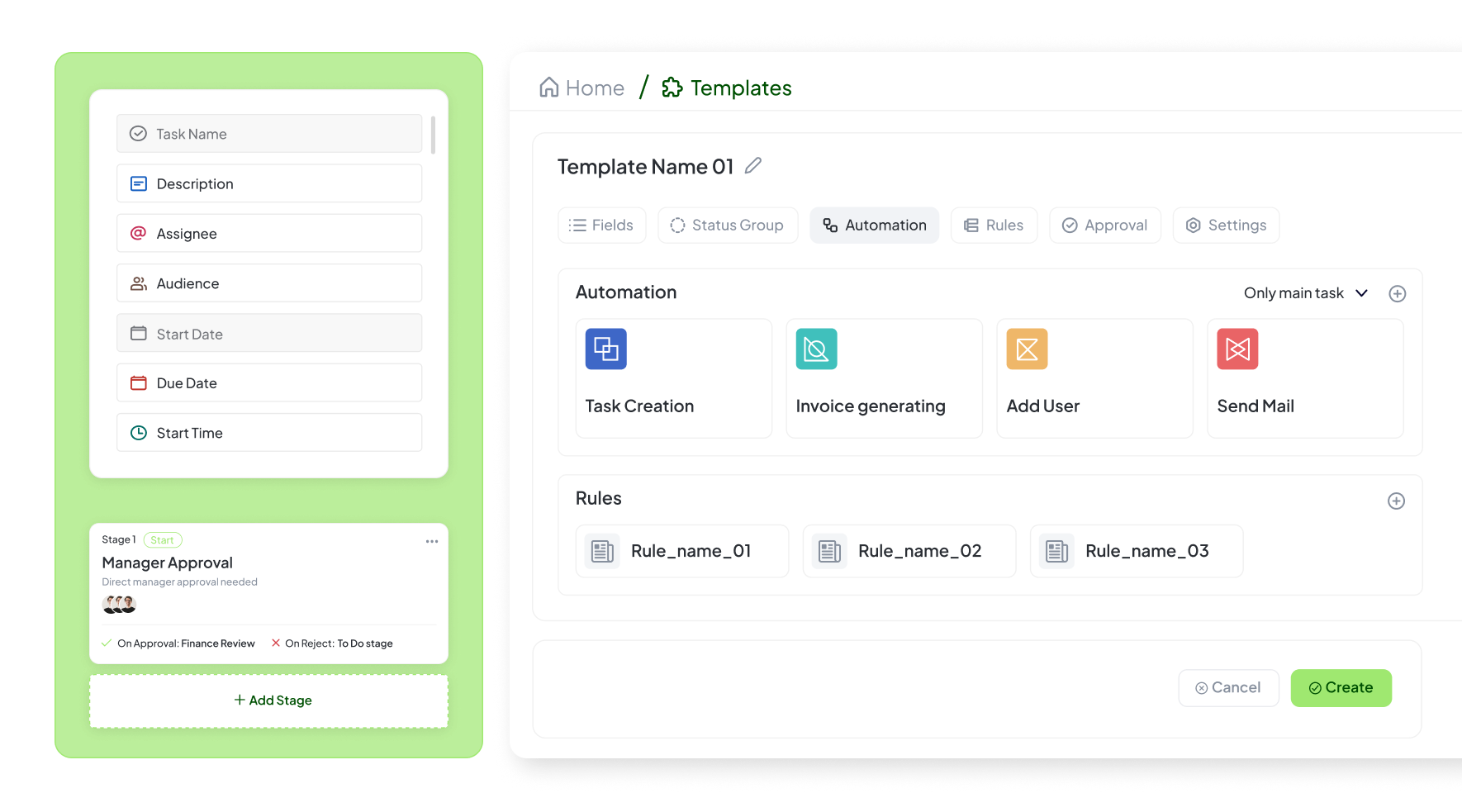
Visual template builder with custom fields
Standardize, Customize, and Scale Your Workflows
Bring order and consistency to your operations with Hidesc Templates — your foundation for structured, repeatable work. Templates allow you to define how tasks are created, who can access them, and how they move through your organization.
Every template includes complete configuration control: custom fields, statuses, permissions, and approval steps — all linked to your existing workflows. Define reusable task structures once and replicate them instantly across departments.
Templates also support task field-level permissions, ensuring each user sees only what's relevant to their role. Combine this with predefined template sets for faster setup, and you'll never start from scratch again. Whether you're onboarding new employees, managing projects, or processing approvals, templates ensure every instance follows the same proven structure while maintaining flexibility for unique requirements.
Template Configuration Studio
Template Settings
Template Options
Custom Fields
Priority
Dropdown
Budget
Number
Client Name
Text
Due Date
Date
Approval Status
Status
Status Flow
Approval Required At:
Ready-to-Use Template Library
Start with professionally designed templates for common business processes. Each template is fully customizable to match your exact requirements. Our library includes templates tested by thousands of teams across industries.
Employee Onboarding
Complete onboarding workflow with IT setup, training schedules, and documentation.
Software Development Sprint
Agile sprint template with user stories, bug tracking, and deployment checklists.
Client Project Kickoff
Structured project initiation with stakeholder mapping and resource allocation.
Expense Approval Process
Multi-level approval workflow with budget validation and reimbursement tracking.
Content Publishing Pipeline
Editorial workflow from draft to publication with review stages.
Security Audit Checklist
Comprehensive security review with compliance verification steps.
Field-Level Permission Control
Define exactly who can see and edit each field in your templates. Our granular permission system ensures data security while maintaining workflow efficiency. Set permissions based on roles, departments, or individual users, and watch as the system automatically enforces these rules across all template instances.
View Permissions
Control who can see each template field
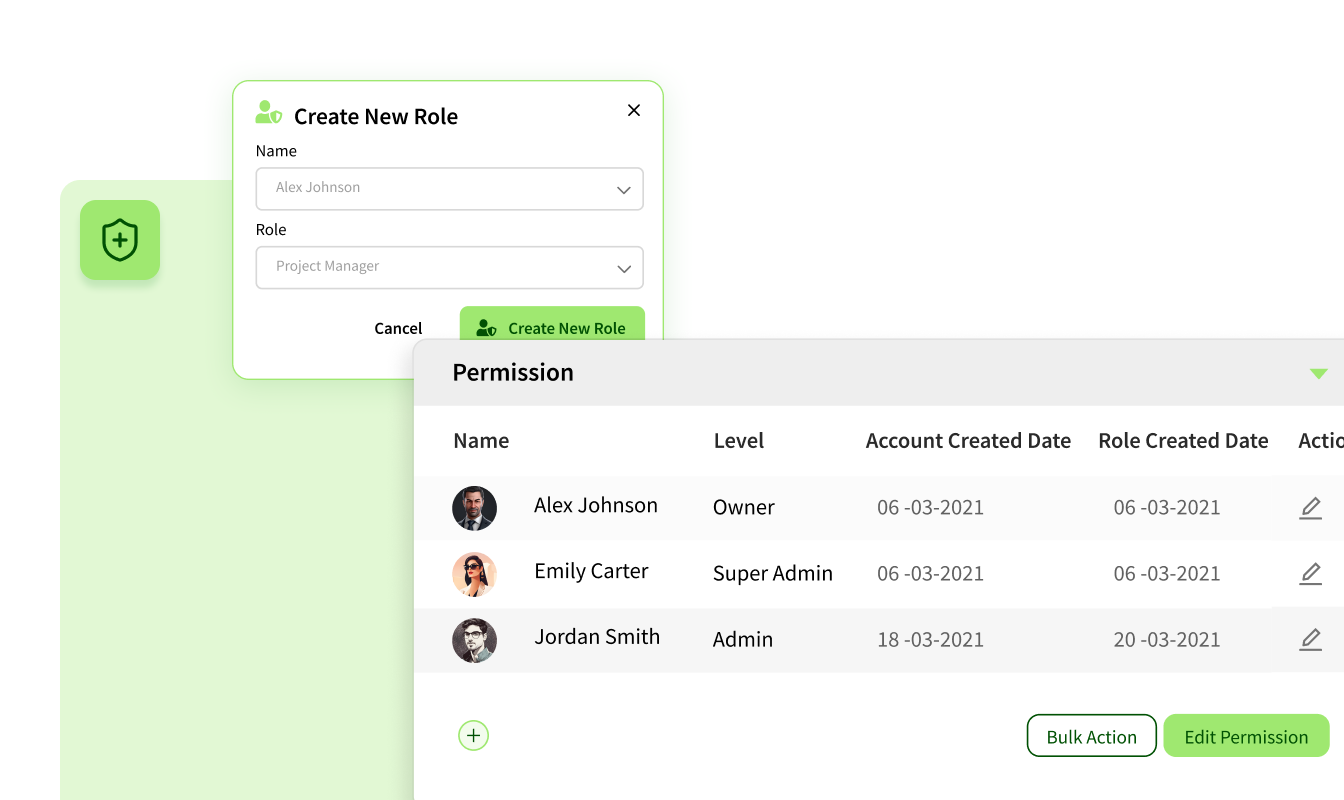
Edit Permissions
Define who can modify template fields
Complete Template Management Features
Task Templates
Define reusable task structures
Workflow Linking
Connect to automated flows
Field Permissions
Control view/edit access
Template Sets
Ready-made workflow models
Configurable Data Fields
Add specific data points
Status Sets
Define workflow stages
Approval Stages
Multi-step verification
Role Permissions
Access by role/team
Visibility Settings
Control template usage
Default Statuses
Standard progress stages
Task Grouping
Collaborative tasks
Time Settings
Configure time tracking
Billing Rules
Set billable options
Status Groups
Custom status flows
Integration Links
Connect to OKRs/Docs
Version Control
Template updates
Audit Tracking
Usage monitoring
Auto-Automation
Trigger-based actions
Template-Based Automation
Templates aren't just structure—they're automation engines. Define rules once, and watch as tasks auto-create, assign, and update based on your conditions. When a template is triggered, it can automatically set deadlines, assign team members, link to related projects, and even start workflows.
Automation Triggers
- On Project Creation: Auto-generate all project tasks from template
- Status Change: When task reaches "Review", create approval subtasks
- Date-Based: Generate monthly reports using reporting template
- Team Assignment: Apply department-specific templates automatically
Smart Actions
- Auto-Assign: Distribute tasks based on workload and expertise
- Set Deadlines: Calculate due dates based on template timelines
- Link Dependencies: Connect related tasks automatically
- Notify Stakeholders: Alert relevant team members on creation
Ready to get started with Templates?
See how this feature can support your team's workflow in Hidesc.