Organogram
The Organogram in Hidesc provides a visual representation of the team structure within an organization. It displays the hierarchy, roles, and reporting structure of all members, ensuring clarity in responsibilities, reporting lines, and permissions.
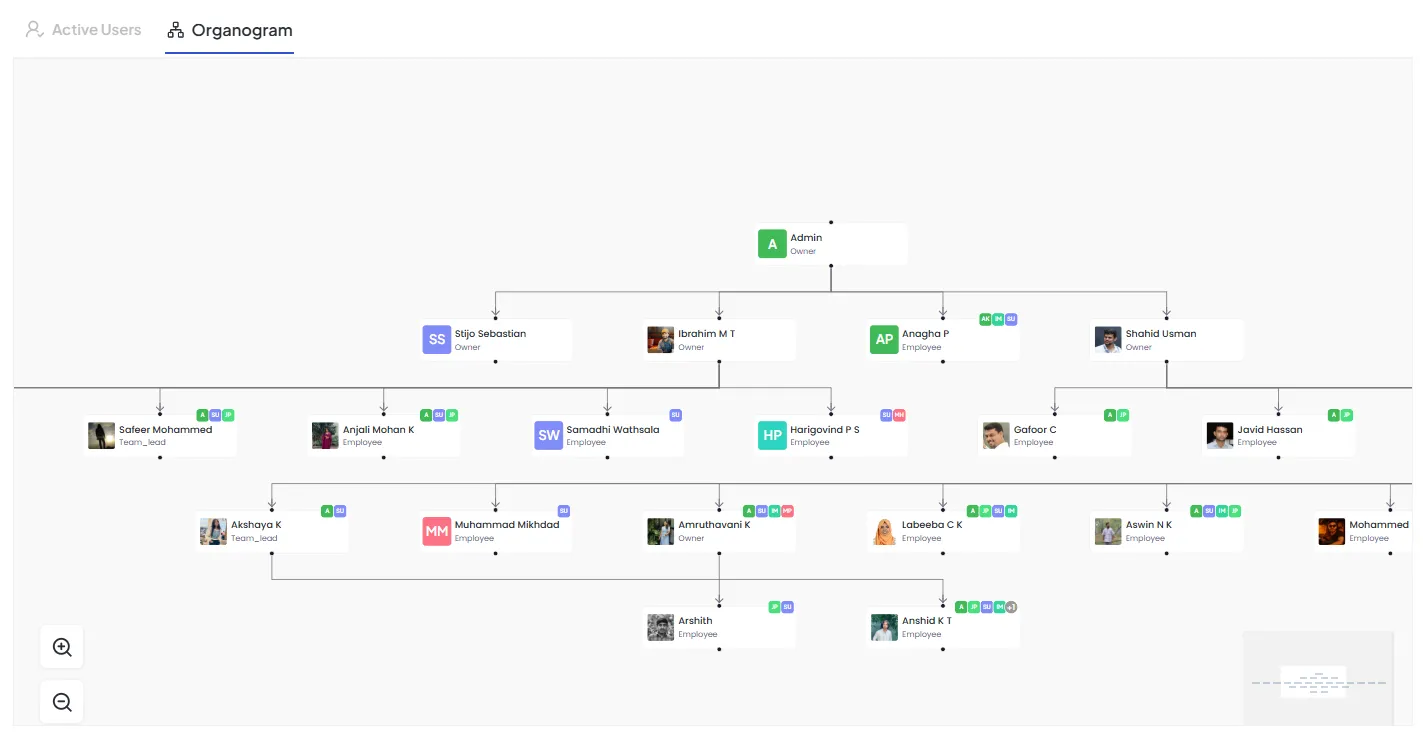
Features of the Organogram
1. Hierarchical View
Displayed in a tree format, starting from top-level Admin/Owners and branching down to Team Leads, Managers, and Employees.
Arrows indicate the reporting structure, showing who reports to whom.
Supports multi-level branching for complex organizations.
2. User Information Card
Profile Initials / Image
Displays initials or uploaded profile picture.
Name
Full name of the user.
Role
Owner, Admin, Team Lead, Employee, Designer, etc.
Assigned Tags / Badges
Special permissions (e.g., Approver “A”, Planner “P”, Sub-lead “SL”, Business Unit “BU”).
Action Icons
- ➕ Add Sub-member: Add new user under this member.
- ✏️ Edit Details: Update role, permissions, or reporting line.
3. Zoom and Navigation
Zoom controls (on left side) allow enlarging or reducing the organogram view.
A mini-map (bottom-right) enables quick navigation across large team structures.
Ensures ease of use for organizations with multiple teams and layers.
4. User Levels
Top Level: Admins / Owners (overall control and visibility).
Middle Level: Team Leads, Managers, and senior employees who handle sub-teams.
Bottom Level: Employees, Designers, and role-specific contributors.
Benefits of the Organogram
Clarity in Structure
Provides a complete visual overview of the organization’s hierarchy.
Reporting Relationships
Makes it easy to identify who reports to whom.
Permission Management
Roles and permissions adapt dynamically with hierarchy changes.
Improved Onboarding
New employees instantly understand the organization’s flow.
Team Collaboration
Ensures accountability by linking hierarchy with tasks and OKRs.
Integration with Hidesc Features
Tasks & Projects
Assignments flow according to reporting lines.
OKRs (Objectives & Key Results)
Company, Team, and Personal objectives align with organogram hierarchy.
Permissions
Access levels are auto-updated based on organogram roles.
Dynamic Updates
Any change in reporting automatically reflects in visibility and permissions.