CA practice management guide
Plan important work, then measure the real effort
As a chartered accountancy firm, you need to manage client follow-ups, compliance deadlines, document collection, internal review, billing, and team workload. The challenge is not only to complete work. It is also to do the right work at the right time, with the right person, and at a profitable cost.
This is why time tracking and timeboxing are important in CA practice management. Timeboxing helps your team plan and protect focus before work starts. Time tracking shows how much time the work actually needed after it is finished.
Quick answer: Timeboxing sets a planned limit for a task, while time tracking records the actual time spent. CA firms can compare both to improve compliance planning, staff capacity, billing, pricing, and client profitability.
What is timeboxing?
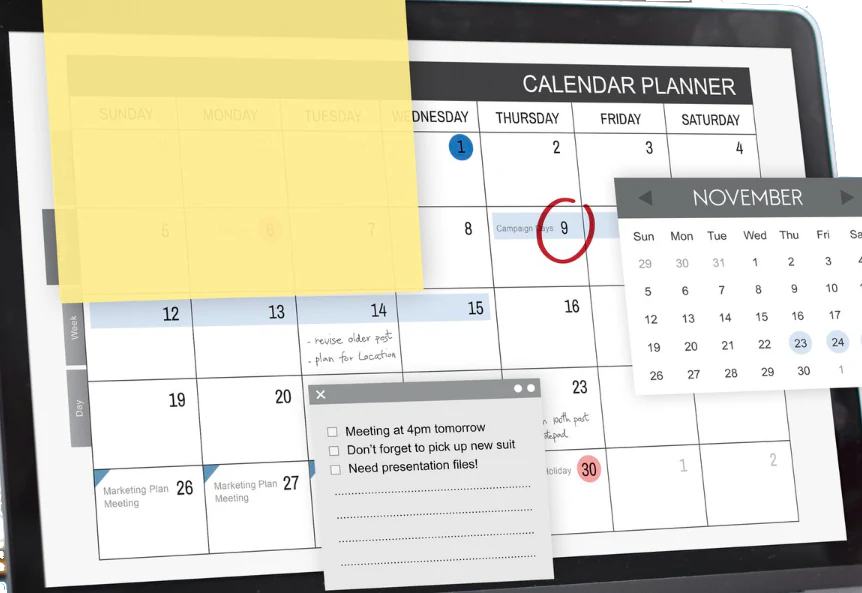
Timeboxing is a planning technique where you commit a fixed amount of time to a task before you start work on it. These planned periods can be organized through calendar and Kanban views so the team can see when focused work should happen.
Illustration: From 9:30 to 10:15 a.m., review the GST reconciliation for Client A. The team member performs the task during the planned period. When the timebox ends, they can complete the task, schedule another timebox, request help, or send it for review.
Timeboxing provides a start and an end to each task. It prevents work from expanding indefinitely and helps staff concentrate on the most important parts of the assignment.
Why timeboxing helps
- Creates urgency for large or complex assignments.
- Lessens procrastination.
- Reserves time for review and compliance work.
- Cuts down on task switching and interruptions.
- Prevents perfectionism from slowing routine work.
- Helps schedule staff capacity during high-volume filing periods.
- Improves estimates for recurring services over time.
What is time tracking?
Time tracking records the time actually spent on a task, client, project, or service. Staff may use a timer, a manual time entry, or a time-tracking feature connected to their assigned task.
Example: 9:30 to 10:15 a.m., review GST reconciliation for Client A.
Time tracking answers an important management question: Where did the firm's time go?
Why time tracking matters
Time tracking helps CA firms:
- Record billable and non-billable hours.
- Generate accurate invoices.
- Understand the actual work involved with each service.
- Track staff utilization.
- Compare estimated time with actual time.
- Identify profitable and unprofitable engagements.
- Improve fixed-fee pricing.
- Support discussions about additional or out-of-scope work.
- Identify tasks to automate, delegate, or redesign.
A connected analytics dashboard can turn these records into workload, utilization, and delivery insights instead of leaving them as isolated timesheet entries.
The difference between timeboxing and time tracking
The difference is straightforward:
- Timeboxing is a plan: "We will spend 45 minutes reviewing this reconciliation."
- Time tracking is a record: "We spent 52 minutes reviewing this reconciliation."
Timeboxing is forward-looking. It helps the team decide how to use time before the work begins. Time tracking is measurement-based. It shows what happened during the work or after it.
One improves focus and task execution. The other improves billing, pricing, utilization, and management decisions. Both work best when connected to the same task management system.
Timeboxing vs time tracking: comparison table
| Aspect | Timeboxing | Time tracking |
|---|---|---|
| Primary question | How long should we spend on this task? | How long did we actually spend on this task? |
| Time direction | Forward-looking: planned before work begins | Measurement-based: recorded during or after work |
| Main purpose | Improve focus, prioritization, and scope control | Measure effort, billing, utilization, and profitability |
| Typical method | Calendar blocks, planned durations, and task schedules | Timers, timesheets, manual logs, and automatic records |
| Best for | Deep work, compliance preparation, reviews, and daily planning | Client billing, payroll, capacity planning, and reporting |
| Output | Planned work periods and improved estimates | Actual hours by client, task, service, or project |
| CA firm example | Reserve 45 minutes to review a GST reconciliation | Record 52 minutes spent reviewing the reconciliation |
| Management benefit | Helps teams complete priority work on schedule | Helps partners improve pricing, staffing, and workflows |
| Best used with | Task management and calendar planning | Practice management, billing, and reporting |
The two approaches complement one another. While time tracking offers proof of the work, timeboxing organizes the work. A company can identify overruns, improve estimates, fine-tune fees, and plan capacity more precisely by comparing the two.
Why CA firms need both
CA firms have deadlines, repeat assignments, client dependencies, internal reviews, and seasonal workload spikes. You may not have enough visibility to manage all of these responsibilities with a simple to-do list.
The best approach is to integrate timeboxing and time tracking in CA practice management software or CA office management software. A firm can use workflow automation to keep recurring steps, reminders, and handoffs connected to the plan.
Timeboxing can be used for GST return preparation, TDS calculations, ITR preparation, ROC compliance, bookkeeping, bank reconciliation, audit documentation, client follow-ups, senior reviews, and advisory meetings.
Time tracking can assist with client billing, utilization reporting, fixed-fee pricing, profitability analysis, workload planning, scope-change conversations, engagement reporting, and bottleneck identification.
Using only timeboxing may leave a firm without reliable effort data. Using only time tracking may show where time went without helping the team plan work more effectively.
Together, they create a complete time-management system.
CA office management and practice management software
CA practice management software helps chartered accountant firms manage client work, compliance activities, team responsibilities, documents, billing, and operational processes in one system.
CA office management software focuses on daily firm coordination. This includes task assignment, team communication, recurring work, client requests, reminders, document management, approvals, and workload monitoring.
A well-designed system can connect both areas so partners and employees manage work from the same platform.
Important features for CA firms
- Compliance calendar for GST, TDS, ITR, ROC, audit, and payroll deadlines.
- Recurring task templates that automatically create repeatable work.
- Ownership of tasks, review steps, approvals, and clear deadlines.
- Automated reminders for staff and clients.
- Client records, confidential documents, work papers, and communication history supported by document management.
- Time tracking integrated with clients, services, and tasks.
- Billing, invoices, utilization, and profitability reports.
- Team workload dashboards showing pending and overdue tasks.
A hands-on time management workflow for CA offices
- Configure recurring service templates for GST, TDS, bookkeeping, payroll, ITR, ROC, audit, and document collection.
-
Add planned timeboxes. For example:
- Bank reconciliation review: 45 minutes.
- GST working-paper preparation: 60 minutes.
- Client document follow-up: 20 minutes.
- Senior review: 30 minutes.
- Partner approval: 15 minutes.
- Track actual time from the assigned task using a timer or manual entry.
- Compare planned and actual time weekly or monthly. Use the results to improve estimates, pricing, templates, staffing, and workflows.
When a completed assignment needs review, an approval workflow can keep the handoff, correction, and final decision attached to the same work item.
When each method helps most
When timeboxing helps most
Timeboxing is particularly useful when a CA office experiences procrastination, frequent interruptions, unclear scope, insufficient focus time, busy-season overload, poor prioritization, or delays caused by switching between clients.
When time tracking helps most
Time tracking is particularly useful when a firm needs accurate billing, better fixed-fee proposals, client profitability reports, staff utilization information, engagement-level effort data, scope-change evidence, resource planning, or visibility into administrative work.
How Hidesc can support CA practice management
For a CA practice management and office management platform such as Hidesc, the value proposition can be expressed simply:
"Plan compliance work with timeboxes. Track real effort with time logs. Manage your CA practice in one place."
Hidesc can help connect clients, recurring compliance tasks, reminders, documents, reviews, team coordination, and time visibility. This supports on-time compliance delivery, lower deadline risk, clear task ownership, better staff capacity planning, accurate billing, improved pricing, and stronger client profitability. Firms can also coordinate client requests and updates through a connected client portal.
Case study: what works best by office type?
The same time-management principles can apply to professional offices in different industries. However, each industry has its own operational priorities.
CA practice management: compliance and profitability
A CA firm managing GST, TDS, ITR, audits, advisory work, client requests, and internal reviews should use timeboxing and time tracking together inside CA practice management software.
Timeboxing protects time for preparation, reviews, calls, and client approvals. Time tracking records the actual effort by client, service, and workflow stage. The firm can use this information to improve pricing, templates, staffing, and service delivery.
NDIS office management: rosters and verified service time
An NDIS provider coordinates support workers, participant schedules, service agreements, shift notes, plan budgets, payroll inputs, invoices, and claims.
NDIS offices need to focus on participant records, service agreements, staff availability, shift rostering, mobile clock-in and clock-out, support notes, timesheet approval, payroll, invoicing, funding monitoring, incident records, and compliance.
Timeboxing is useful for back-office tasks such as care-plan reviews, claims checks, payroll administration, incident follow-ups, and compliance work. NDIS providers generally need specialized NDIS provider management software rather than a generic task or timer application.
Construction office management: field hours and job costs
A construction business manages projects, crews, subcontractors, equipment, materials, estimates, site deadlines, and project budgets.
Construction offices should focus on mobile time tracking by project and cost code, crew and equipment scheduling, verified site attendance, daily reports, progress updates, photos, labor budgets, project phases, dependencies, and communication between site teams and the office.
Timeboxing helps with tender preparation, estimation, bid reviews, and other focused office planning. Time tracking then gives the business a record of the effort spent on each project and cost area.
A practical way to start
Start with one recurring service. Plan its important steps with timeboxes, record the actual effort for one month, and compare the two. The results can help the firm refine its estimates, templates, workload plans, and pricing without changing every process at once.